Showing posts with label printer. Show all posts

Sunday, September 21, 2014

Driver HP LaserJet 1010 untuk Windows 7 32-bit


Printer should be offline and Automatic Updates disabled. Othervise Windows will automatically download drivers from the updates.

1. Download the XP driver for HP Laserjet 1010. ( http://h20000.www2.hp.com/bizsupport/TechSupport/SoftwareIndex.jsp?lang=en&cc=us&prodNameId=306507&p... ).

2. Go to Devices and Printers and click the Add Printer button.

3. Click Add a Local Printer.

4. Check Use an Existing Port: LPT1.

5. Select Have Disk and Browse to the location where you have downloaded the XP driver. Select HP1010U.inf file.

6. It will give you an error. It is because the local Printer spooler service has stopped. Go to Control Panel -> Administrative Tools -> Services and in the list find Printer Spooler service and with the right click select start. Now go back to the window for installing the printer and click next. It will give you an error that a printer with the same name already exists. Click cancel, go to Devices and printers and refresh the page. You should find the printer with the name you gave. Now right click the Icon, select printer properties and in ports select Dot4.

7. Turn on the printer. Windows should now find the driver for it.

8. When installing the printer on the network you will get the error like in step 6. Just restart Printer spooling service on the local machine and it will work.

Thursday, August 7, 2014

Masalah 'Ink Absorber Full' Canon PIXMA MG2270


Reset printer  harus dalam keadaan SERVICE MODE. Caranya baca langkah berikut.


Matikan printer  dengan menekan tombol POWERnya. Jangan cabut kabel power
Tekan dan Tahan tombol STOP/RESET diikuti dengan menekan Tombol POWER. Jadi kedua tombol posisi tertekan.
Lepas tombol STOP/RESET tapi jangan lepas tombol POWER.Dalam keadaan tombol POWER masih tertekan, tekan tombol STOP/RESET sebanyak 5 kali.
Kemudian lepaskan kedua tombol bersamaan, maka printer akan berada dalam kondisi Service Mode.
Di komputer anda akan mendeteksi hardware baru. Abaikan saja .
Download service tool yang terbaru v.3400.

Siapkan kertas beberapa lembar di printer.
Jalankan service tool v.3400.
Di menu clear ink counter pilih MAIN BALCK kemudian set printer akan cetak 1 lembar.
Di menu ink absorber counter pilih MAIN COLOUR kemudian set.
Klik eeprom, printer akan cetak 1 lembar ( jika tidak bisa abaikan saja lngsung ke lankah 6 ).
Pilih auto kemudian start print cetak halaman test print tunggu sampai semua menu selesai.
Matikan Printer Anda lalu hidup kan Kembali dan Printer anda Sudah siap digunakan.

Tuesday, January 15, 2013

HP Deskjet d2560: Resume Indicator Berkelip-kelip

Sekiranya pengguna menghadapi masalah untuk mencetak dan mendapati cahaya dari Resume Indicator (simbol anak panah ke bawah) berkelip-kelip, sila cuba langkah berikut:


Kemudian, run aplikasi HP Print and Scan Doctor yang boleh dimuat turun melalui pautan ini.


Thursday, January 3, 2013

Canon MP287: Error P07

Langkah untuk mengatasinya:

Masuk Service Mode:
  • Matikan printer dengan power cord dan kabel USB masih terpasang.
  • Tekan butang  Stop/Reset dan tahan.
  • Tekan butang Power (jangan lepaskan butang Stop/Reset).
  • Lepaskan butang Stop/Reset;
  • Dalam keadaan butang Power masih tertekan, tekan butang Stop/Reset sebanyak 6 kali.Abaikan sebarang Windows pop-up yang terpapar.
Reset Software 
Muat turun perisian MP287 Service Tool  dan laksanakan langkah seperti gambarajah berikut:


Kemudian matikan printer dan uji.
Selesai.

Tuesday, June 26, 2012

Wednesday, June 20, 2012

HP Deskjet F4185: Tidak Boleh Cetak Warna Hitam


1. Keluarkan black ink cartridge dari carrier.
2. Kemudian rendamkan head pada cartridge tersebut dalam air panas.
(Pastikan bahagian chipboard tidak terkena air!)
3. Pasang semula cartridge berkenaan.
4. Laksanakan print test beberapa kali dengan/tanpa setting seperti di bawah.


Thursday, May 10, 2012

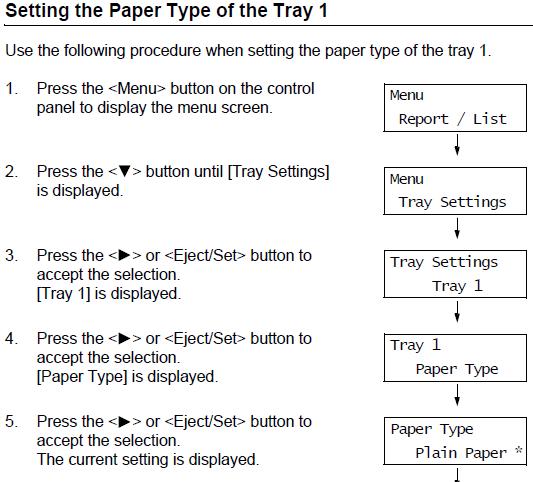
FujiXerox DocuPrint C110 B: Paparan "Wrong paper size"


Sekiranya pencetak hanya mampu mencetak sehelai sahaja dalam satu-satu masa serta keluar paparan "Wrong paper size", cuba laksanakan langkah berikut:

Setting the Paper Type and Size of the Tray 1 on the Control Panel


Kemudian, lakukan pengujian.

Wednesday, February 22, 2012

Canon PIXMA iP1000: Waste Ink Absorber Full


Masalah ini boleh diselesaikan dengan kaedah berikut:
  1. Tanggalkan power connector pencetak.
  2. Tekan button ON dan sambungkan power connector (lampu pada button ON akan menyala).
  3. Lepaskan button ON.
  4. Tekan semula button ON untuk hidupkan pencetak tersebut.
  5. Gunakan program iP1500 Service Tool untuk reset waste ink counter.
  6. Selepas selesai, restart pencetak tersebut.

Monday, January 30, 2012

Canon PIXMA iP1600: Waste Ink Absorber Full

Langkah 1:

1. Remove INK cartridges.
2. Unplug AC power.
3. Hold power button and plug AC power while holding the power button in.
4. Press resume 4 times.
5. Print test.

Jika berjaya langkah 5, turn off printer tersebut dan print test sekali lagi. Sekiranya masalah masih berlaku, laksanakan langkah berikut:

Langkah 2:

1. Remove INK cartridges.
2. Unplug AC power.
3. Hold power button and plug AC power while holding the power button in.
4. Press resume 2 times.
5. Print test.
6. Run iPTool -> Select printer -> Reset Main & Reset Platen.
7. Print test.
8. Turn off and turn on the printer.
9. Print test.

Tuesday, November 22, 2011

Cara Reset Pencetak EPSON Stylus C67

Berikut adalah mesej yang dipaparkan ketika mencetak menggunakan Epson Stylus C67:


Poses reset boleh dilakukan dengan menggunakan perisian  SSC Service Utility versi terkini (telah dicuba versi 4.30).

Setelah selesai proses reset, restart printer dan print test.

Sunday, October 30, 2011

Brother DCP-7030: Drum Error


Sekiranya selepas membersih Corona Wire (seperti dalam arahan) tidak berkesan, penggantian drum perlu dilakukan.

Monday, October 17, 2011

Monday, October 10, 2011

Cara Reset Pencetak EPSON Stylus C90

Kaedahnya boleh dirujuk di laman blog berikut:
  1. Versi Inggeris
  2. Versi Indonesia 

Cara reset EPSON C90 yang telah dicuba:
1. Download dan install driver EPSON C90.
2. Download perisian reset.
3. Ubah tarikh komputer menjadi 11 Julai 2007.
4. Klik "AdjProg.exe"

5. Kemudian ikut arahan berikut ini :


6. On dan off pencetak. Lampu berwarna hijau akan bernyala statik. Bererti pencetak EPSON C90 dalam keadaan sedia.

Friday, September 9, 2011

Masalah 'Ink Absorber Full' Canon PIXMA iP1980

Mula-mua, reset secara manual:
• Unplug the power cord while simultaneously pressing the power button
• After the power cord unplugged fixed in position before pressing the power button
• Then, plug the power cord back into the printer (fixed position of pressing the power button the printer)
• Then the power light is green living, then press the resume button is colored orange (alternately press the power button and press the resume button)
• After pressing the resume button and then release
• Press the power button again
• Then release the button power. 

Kemudian gunakan kaedah ini dengan menggunakan resetter GeneralToolsforCanonPixmaip1880-xp

Wednesday, May 11, 2011

HP LaserJet and Color LaserJet Printers - Files Print Slowly or Hang in Print Queue While Processing

Berikut adalah antara tips yang pernah dicuba (highlight) bagi mengatasi masalah slow printing:

"There are many other factors that can affect how quickly a print job is printed or cause it to hang in the print queue. The factors listed below can all have a direct affect on how quickly jobs print.
  • The specific printer being used.
  • Amount of installed memory in the printer. Note that PDF and other Adobe files can have larger file sizes that require more printer memory that basic files such as text documents.
  • Printer driver being used, including version and type (PS, PCL, etc.). Note that generally, Adobe files will print faster if a PS driver is used instead of a PCL 5 or PCL 6 driver (if available). Not all printers have a PS driver available as an installable driver.
  • Number of print jobs in the print que.
  • Operating system on the PC the print job was sent from.
  • Available resources on the PC or server the print job was sent from such as amount of installed memory.
  • Host based printers spool print jobs on the PC and not the printer, this can have an effect on print speed.
  • Connection type between the printer and PC or server, (USB, Parallel, Network, etc.)
  • Complexity of the print job (file size, number of images, etc.)
  • The printer has an installed hard disk (if available)"

Windows driver types

Three Windows printer drivers are available: PCL 5e, PCL 6 and HP postscript level 3 emulation. Choose a printer driver based on the way you use the printer.

  • Use the PCL 5e printer driver for faster printer performance and a quick first page out with 600 dpi print quality.
  • Use the PCL 6 printer driver for enhances print quality. The PCL 6 driver allows you to take advantage of HP's proprietary ProRes 1200 and FastRes 1200 technologies. Printer performance and first page out may be slower with this driver.
  • Use the HP postscript level 3 emulation printer driver for HP postscript level 3 emulation. Certain printer features are not available in this printer driver.

    Ref: HP Support Document

    Sunday, November 21, 2010

    Cara Reset Canon MP198 (Error E27)


    1. Printer dalam keadaan mati dan kabel elektrik terpasang.
    2. Tekan dan tahan STOP/RESET kemudian tekan dan tahan POWER.
    3. Lepas butang STOP/RESET (butang POWER jangan dilepaskan).
    4. Tekan STOP/RESET dua (2) kali, kemudian lepaskan butang POWER.
    5. Biarkan Lampu Hijau berkelip 2 kali hingga print head berhenti bergerak. Dan LED panel menunjukkan angka '0'.
    6. Komputer akan detect new hardware.
    7. Keadaan ini menunjukkan printer MP198 dalam keadaan SERVICE MODE dan sedia direset.

    DOWNLOAD PROGRAM RESETTER MP198.

    1. Exctract File Resetter MP198.
    2. Sediakan dua (2) helai kertas di printer (untuk proses reset).
    3. Jalankan program Resetter MP198.


    4. Klik "MAIN", maka printer akan berproses, kemudian MP198 akan print satu halaman dengan tulisan " D=000.0 dan ....".
    5. Klik " EEPROM Clear ".
    6. Kemudian klik " EEPROM ", dan printer akan print hasil Resetter MP198. Salah satu barisnya tulisannya sbb: "TPAGE(TTL=00000 COPY=00000)"
    7. Matikan Printer dengan menekan butang POWER.
    8. Lakukan ujian copy dan print test.

    9. Selesai.
    Sign up for PayPal and start accepting credit card payments instantly.